Rack KVM Switch and LCD Console — 8/16/32 Ports, IP Remote
Rack KVM switches and LCD consoles for server rooms, including KVM over IP and CAT5 access.
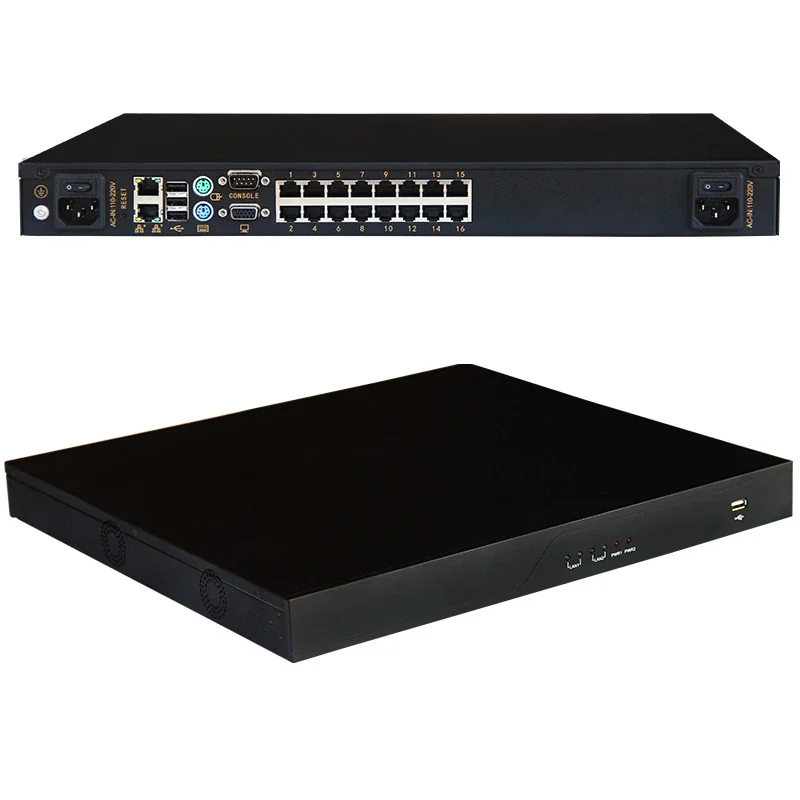
A KVM switch lets one keyboard, monitor and mouse control 8 or 16 servers from a single console. Rack KVMs are usually 1U, support Cat5 or direct cables up to 50 m, and can be combined with an IP module for remote access. Choose 8 ports for a small room and 16 ports for a full rack.
Last reviewed: 2026-11-07
KVM is used for local and remote server management, not for consumer desktop sharing. The rack version supports cascading, hot-plug and multi-platform servers.
Choose port count, local or IP access, LCD size and cable type. Confirm compatibility with the server models in the rack.
Best for
- Server rooms with limited console space
- Remote or branch sites needing IP access
- Mixed-model server racks
Key specifications
KVM selection
| Type | Ports | Access | Typical use |
|---|---|---|---|
| Rack KVM | 8 / 16 / 32 | Local | Server room console |
| KVM over IP | 8 / 16 / 32 | Local + remote IP | Remote management |
| LCD KVM console | 8 / 16 | Local | 1U console drawer |
How to choose
Count servers
Choose 8, 16 or 32 ports and allow for cascade expansion.
Choose access
Local KVM for the room; KVM over IP for remote management.
Confirm compatibility
Check server interfaces, cable types and supported resolutions.
What a KVM switch does
A KVM switch shares one console across multiple servers. It reduces the number of monitors, keyboards and mice in a server room and lets technicians work from a single position. Rack KVMs are 1U units that mount in the cabinet.
KVMs are used in server rooms, data centers, labs and broadcast facilities. They are especially useful during commissioning, maintenance and emergency recovery when network-based management is unavailable.
Port count, cabling and distance
Common port counts are 8 and 16. An 8-port KVM suits a small rack or a branch room; a 16-port KVM suits a full 42U rack. Some models are cascadable to 32 or 64 servers.
Cabling options include direct KVM cables and Cat5 extenders. Cat5 extenders can reach 50 m or more, which simplifies cable management in large rooms. Confirm the supported resolution, the cable type and the maximum distance.
Local console and remote access
A local console is a 1U drawer with a 17-inch or 19-inch LCD, keyboard and touchpad. It gives direct access at the rack. An IP KVM module adds remote access over the network, with BIOS-level control and virtual media.
For security, use strong passwords, two-factor authentication and a separate management network. Keep the KVM firmware updated and log access for audit.
Selection and installation
Select the port count, cable type, resolution and remote access. Confirm the rack space (1U), the power input and the console drawer size. Install the KVM at a comfortable height, label the ports and test every server before handover.
KVM switch reference
| Item | Typical value | Notes |
|---|---|---|
| Ports | 8 / 16 | Cascadable |
| Rack height | 1U | 19-inch |
| Console | 17 / 19 inch LCD | Keyboard + touchpad |
| Cable | Direct / Cat5 | Up to 50 m |
| Resolution | 1920 × 1080 | Confirm model |
| Remote | IP module | BIOS-level |
| Power | 100–240 V AC | Internal PSU |
| Security | Password / 2FA | Management network |
8-port vs 16-port KVM
| Item | 8-port | 16-port |
|---|---|---|
| Servers | Up to 8 | Up to 16 |
| Rack size | Small / branch | Full 42U |
| Cost | Lower | Higher |
| Cascade | Optional | Optional |
| Use | Edge / lab | Data center |
KVM selection checklist
| Item | Target | Why |
|---|---|---|
| Ports | Servers + 2 spare | Growth |
| Cable | Direct / Cat5 | Distance |
| Remote | IP module | Lights-out |
| Console | 17 / 19 inch | Space |
| Resolution | 1920 × 1080 | Display |
| Security | 2FA / logging | Audit |
Frequently asked questions
08 Q&A How many servers can a 16-port KVM control?
Does a rack KVM support Dell, HPE and Lenovo?
What is the difference between KVM and KVM over IP?
What is a KVM switch used for?
Should I choose an 8-port or 16-port KVM?
Can a KVM switch be accessed remotely?
What cable distance does a KVM support?
Do I need a console drawer?
Related products
Related pages
Send us your rack schedule or floor plan
Share cabinet quantities, U heights, power loads and the destination port. Our engineering team will confirm the configuration, drawing and production lead time.
Request a quotation